

Introducing



This release focuses on improving letter generation, patient summary quality, worklist usability, filter management, and real-time data accuracy across the platform.
Release at a glance
New & revamped
F.01
Complete redesign of the
Letter Generation.
Problem
Letter generation was slow due to reliance on Ask AIRA, adding ~10–20 seconds of delay, while template creation lacked guided field insertion, preview, and minimise functionality. making the workflow manual and increasing the risk of unsaved work loss.
Impact
- Significantly faster letter generation by removing Ask AIRA dependency and reducing delays.
- More standardised and reliable letter creation through guided field insertion and preview before sending.
- Reduced workflow disruption with minimize functionality and draft preservation during navigation.
What’s New
Auto-Populated Patient Details
Patient details such as date, name, DOB, gender, address, MRN, and exam type now auto-fill, reducing manual steps and latency.
Report-Based Field Selection
The “Select Report” section lets users choose the report used to auto-fill dynamic fields like Exam Type.
Draft Preview & Recovery
Preview completed letters before sending, minimize to review patient records, and retain drafts with save/discard prompts.
Specific to dates added in the letter, we saw error and formatting issues while filling these
- Today's Date/Current Date - Based on user location, the current/today date will be added. Format will be MM/DD/YYYY
- DOB - This issue will persist where EMR is not available(possible for sited with HL7based integration). Format will be MM/DD/YYYY
- Exam Date, Report Date - We don't receive this information as part of our integration framework. We have to rework this to receive this information, post that right information will be auto-filled. Format will be MM/DD/YYYY
Date Field Formatting & Updates
Guided Tag Insertion
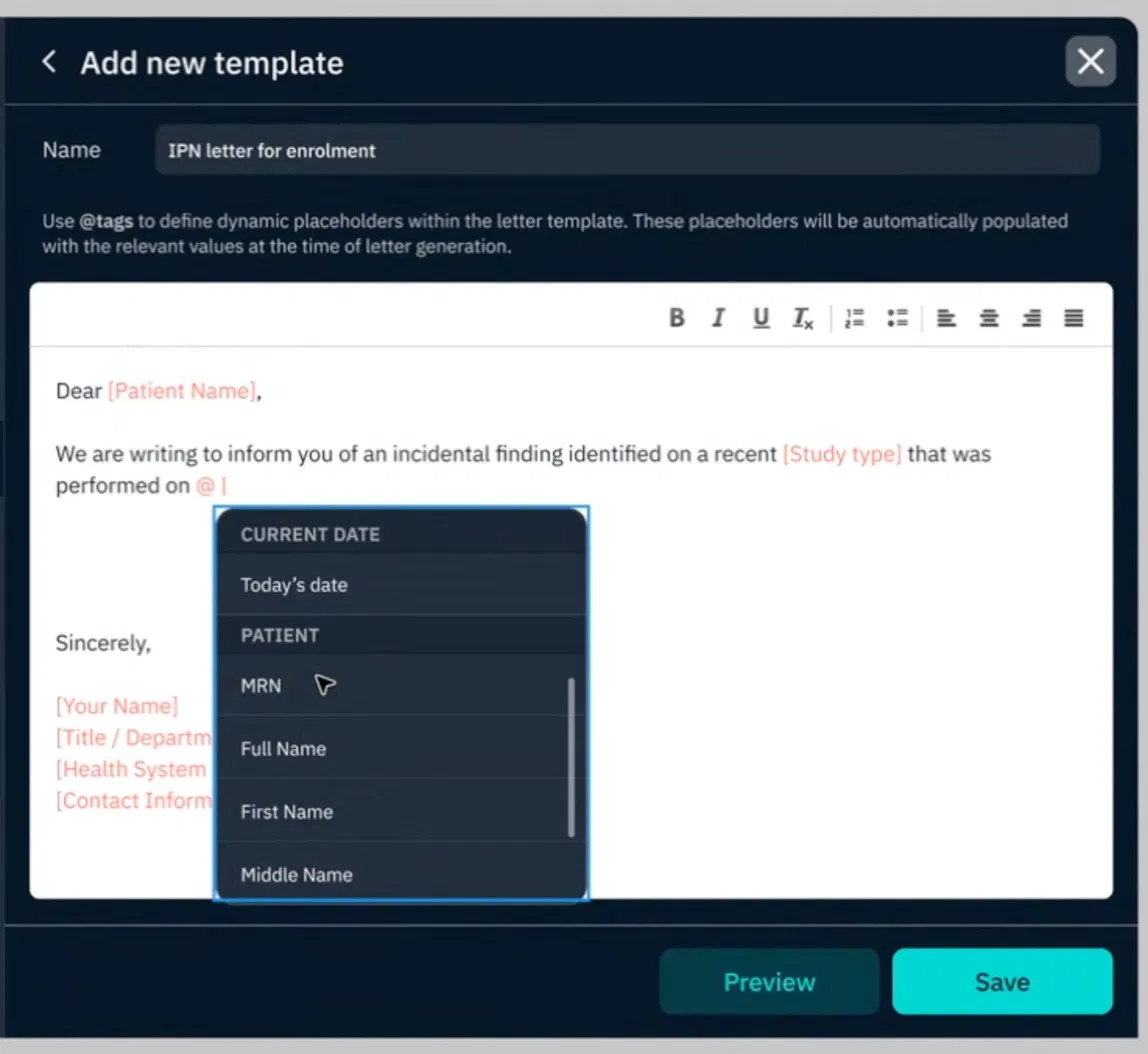
Template creation now includes an @-triggered dropdown to quickly insert standardized data fields such as dates, patient fields, and report fields.
Minimized Draft Support
The letter panel can now be minimized during drafting, allowing clinicians to navigate qTrack without losing progress. Active drafts remain highlighted in the toolbar for visibility.
Unsaved Draft Warning
Switching patients with unsaved letter changes now triggers a warning prompt, allowing users to complete or discard the draft to prevent accidental data loss

User selecting letter template and the pertaining report against which letter gets generated
Example of inserting data fields into letter templates that are automatically filled during letter generation.
F.02
Saved filter changes & usability overhaul
Problem
- The worklist Filter panel required too many clicks, with saved filters hard to access and no direct option to reorder or delete them from the worklist.
- In light mode, selected saved filters in the search panel were difficult to read due to poor text contrast.
Impact
- Faster, lower-friction filter access and application
- Full filter management (reorder, delete) without leaving the worklist

What’s New
Reorder Saved
Filters
Saved filters can now be reordered via drag-and-drop and deleted directly from the worklist without navigating elsewhere.
Applying Filters
Saved filters are now easier to access with a visible "Show more" option and significantly fewer clicks to apply filters.
Saved filter
Display
Redundant saved filter display in the expanded search view has been removed, while the same options remain available in collapsed view.
Light mode readability issues for selected saved filters have been fixed with improved text contrast.
Light Mode
Readability
Placeholder
F.03
Alpha-numerical ordering & task
owner search.
Problem
Letter templates, task owner lists, and task owner filters were unordered, making lookup and assignment slow and inefficient, especially for high-volume sites with large user lists.
Impact
Faster and more efficient template and task owner lookup, especially for high-volume sites with large user lists.

What’s New
Alpha-Numerical Sorting
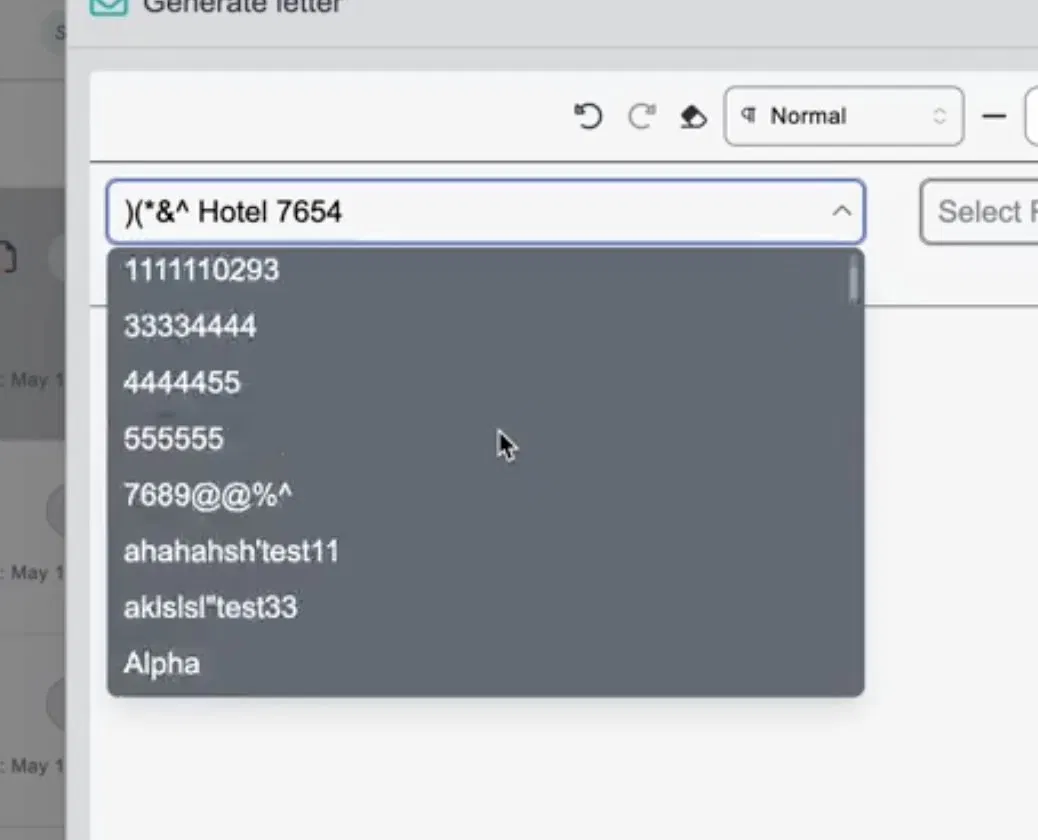
Letter templates, task owners in the task creation modal, and task owner filter options are now all sorted in alpha-numerical order
Searchable Task Owner Assignment
In addition, task owner assignment now supports a search-by-name input, replacing the plain dropdown for high-volume sites where the user list is extensive.
Example of how letters are ordered for the user
F.04
Worklist date column, consolidated into Patient info
Problem
The worklist had a separate dedicated column for date created, consuming screen real estate and creating a fragmented layout. Sorting options were not clearly tied to the patient info context.
Impact
- Cleaner, less cluttered worklist layout
- Flexible sorting within a unified patient info column
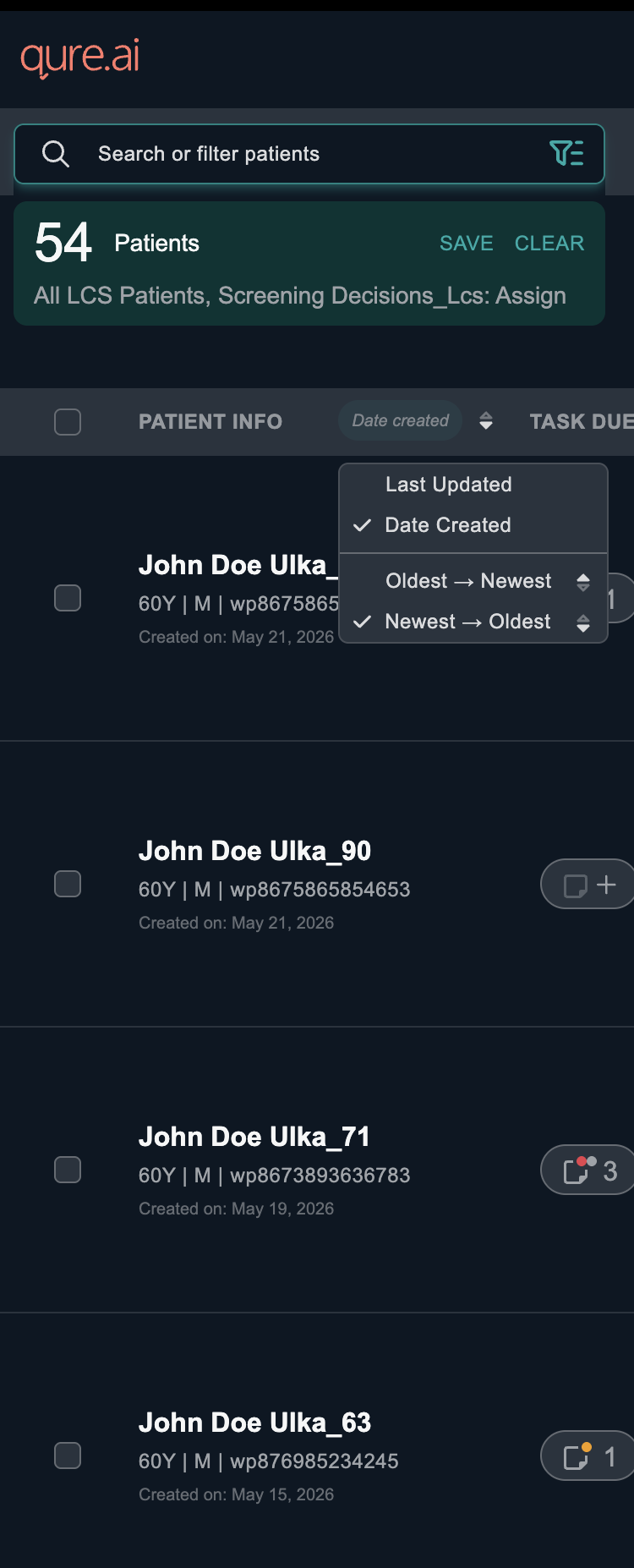
New worklist has patient name and created date under one column and sortable
What’s New
Sorting Options
The separate Date Created column has been removed, with date details now integrated into the Patient Info column and sorting options available for Date Created and Date Updated to keep the worklist cleaner and more compact.
Sort by Task Due Date
Task due date based sorting is available in collapsed worklist format
F.05
Patient summary Qualitative improvements
Problem
The patient summary used emoji icons, relative time language ("today", "tomorrow") with informal formatting and excessive contextual input, resulting in less clinically appropriate summaries and slower generation performance.
Impact
- Cleaner, more clinically appropriate patient summaries with more consistent and auditable output through deterministic rendering.
- Faster summary and auto-tag generation by reducing unnecessary LLM input and processing overhead.
Simplified Patient Summary UI
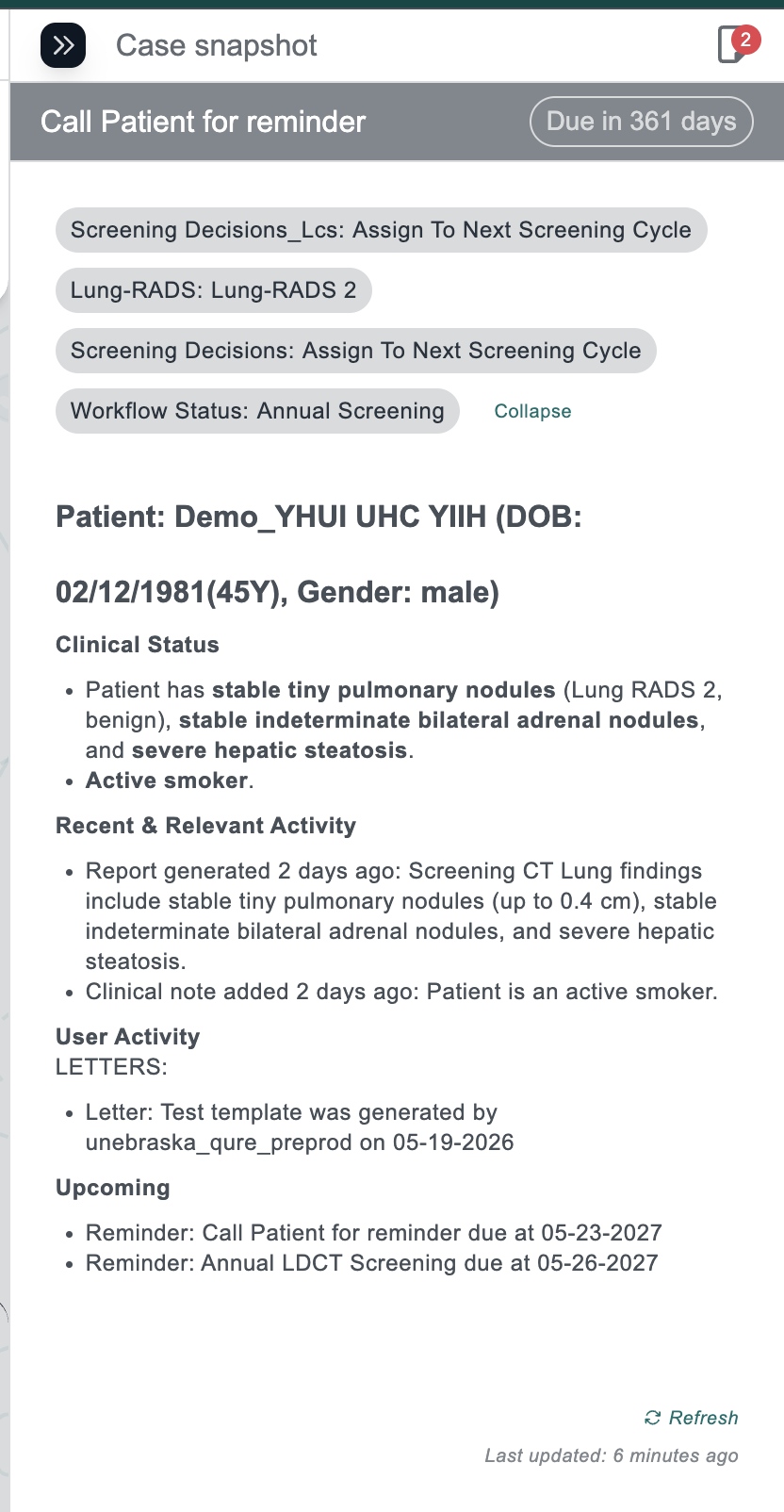
Section icons have been removed from the patient summary UI.
Explicit Date
Display
Relative date references ("today", "tomorrow") are replaced with explicit dates throughout.
Refined LLM Input Handling
The LLM now receives only radiology reports and few EMR datapoints like gender, DOB; Clinical notes including forms, letters, reminders, and demographics are excluded from LLM input and instead rendered deterministically.
What’s New
Enhancements
Minor improvements
01
Task creation has been streamlined with a clearer UI, improved calendar navigation, and quick-select due date buckets for easier scheduling. Pending task counts now reflect only incomplete tasks, while AIRA-suggested actions correctly populate task titles.
Placeholder
02
The tagging mechanism has been improved with clearer visual highlighting, uninterrupted multi-select support, and smoother tag submission. Tags under review now automatically move to the submitted section once approved.
Placeholder
03
We’ve moved the display mode toggle from Settings to the home screen for quicker and easier access. You can now switch display modes instantly without navigating away from your main workflow.
Placeholder
04
The filter experience now includes a dedicated task type filter and multi-select support for tag-based custom fields, allowing users to multi-select tag options even for the tags that are configured as single-select.
Placeholder
Fixes
Bug fixes
01
When a user accepted a suggested tag from a radiology report, the acceptance was not reflected immediately at the patient tag level via WebSocket. Tag selections from reports now update patient-level tags in real time.The same problem existed in certain cases for notes, letters in navigation section. These are now resolved
02
When creating a task from AIRA-suggested action items, the suggested content was being populated into the Task Description field instead of the Task Title. Content from suggested next steps now correctly populates the Task Title.
03
When the app was left open, the patient worklist would refresh but the patient detail panel in the centre would retain stale content. The centre panel now refreshes in sync with worklist updates.
04
When the expanded worklist was sorted by task due date, newly arriving patients were incorrectly appearing at the top of the list, disrupting the sort order. New patients no longer override the active sort when the list is ordered by due date.
05
"Next patient" and "previous patient" navigation buttons were appearing at the top of the image viewer. These buttons have been removed from the image viewer context.
06
In the Add Patient section, entered DOB values were difficult to read in light mode because the text colour blended with the background, making it hard for users to verify the entered date.

Introducing


This release focuses on improving letter generation, patient summary quality, worklist usability, filter management, and real-time data accuracy across the platform.

Release at a glance
New & revamped
F.01
Complete redesign of the
Letter Generation.
Problem
Letter generation was slow due to reliance on Ask AIRA, adding ~10–20 seconds of delay, while template creation lacked guided field insertion, preview, and minimise functionality. making the workflow manual and increasing the risk of unsaved work loss.
Impact
- Significantly faster letter generation by removing Ask AIRA dependency and reducing delays.
- More standardised and reliable letter creation through guided field insertion and preview before sending.
- Reduced workflow disruption with minimize functionality and draft preservation during navigation.
What’s New
Auto-Populated Patient Details
Patient details such as date, name, DOB, gender, address, MRN, and exam type now auto-fill, reducing manual steps and latency.
Report-Based Field Selection
The “Select Report” section lets users choose the report used to auto-fill dynamic fields like Exam Type.
Draft Preview & Recovery
Preview completed letters before sending, minimize to review patient records, and retain drafts with save/discard prompts.
Specific to dates added in the letter, we saw error and formatting issues while filling these
- Today's Date/Current Date - Based on user location, the current/today date will be added. Format will be MM/DD/YYYY
- DOB - This issue will persist where EMR is not available(possible for sited with HL7based integration). Format will be MM/DD/YYYY
- Exam Date, Report Date - We don't receive this information as part of our integration framework. We have to rework this to receive this information, post that right information will be auto-filled. Format will be MM/DD/YYYY
Date Field Formatting & Updates
Guided Tag Insertion
Template creation now includes an @-triggered dropdown to quickly insert standardized data fields such as dates, patient fields, and report fields.
Minimized Draft Support
The letter panel can now be minimized during drafting, allowing clinicians to navigate qTrack without losing progress. Active drafts remain highlighted in the toolbar for visibility.
Unsaved Draft Warning
Switching patients with unsaved letter changes now triggers a warning prompt, allowing users to complete or discard the draft to prevent accidental data loss

User selecting letter template and the pertaining report against which letter gets generated
Example of inserting data fields into letter templates that are automatically filled during letter generation.
F.02
Saved filter changes & usability overhaul
Problem
- The worklist Filter panel required too many clicks, with saved filters hard to access and no direct option to reorder or delete them from the worklist.
- In light mode, selected saved filters in the search panel were difficult to read due to poor text contrast.
Impact
- Faster, lower-friction filter access and application
- Full filter management (reorder, delete) without leaving the worklist
What’s New
Reorder Saved
Filters
Saved filters can now be reordered via drag-and-drop and deleted directly from the worklist without navigating elsewhere.
Applying Filters
Saved filters are now easier to access with a visible "Show more" option and significantly fewer clicks to apply filters.
Saved filter
Display
Redundant saved filter display in the expanded search view has been removed, while the same options remain available in collapsed view.
Light mode readability issues for selected saved filters have been fixed with improved text contrast.
Light Mode
Readability
Placeholder
F.03
Alpha-numerical ordering & task
owner search.
Problem
Letter templates, task owner lists, and task owner filters were unordered, making lookup and assignment slow and inefficient, especially for high-volume sites with large user lists.
Impact
Faster and more efficient template and task owner lookup, especially for high-volume sites with large user lists.
What’s New
Alpha-Numerical Sorting
Letter templates, task owners in the task creation modal, and task owner filter options are now all sorted in alpha-numerical order
Searchable Task Owner Assignment
In addition, task owner assignment now supports a search-by-name input, replacing the plain dropdown for high-volume sites where the user list is extensive.
Example of how letters are ordered for the user
F.04
Worklist date column, consolidated into Patient info
Problem
The worklist had a separate dedicated column for date created, consuming screen real estate and creating a fragmented layout. Sorting options were not clearly tied to the patient info context.
Impact
- Cleaner, less cluttered worklist layout
- Flexible sorting within a unified patient info column
New worklist has patient name and created date under one column and sortable
What’s New
Sorting Options
The separate Date Created column has been removed, with date details now integrated into the Patient Info column and sorting options available for Date Created and Date Updated to keep the worklist cleaner and more compact.
Sort by Task Due Date
Task due date based sorting is available in collapsed worklist format
F.05
Patient summary Qualitative improvements
Problem
The patient summary used emoji icons, relative time language ("today", "tomorrow") with informal formatting and excessive contextual input, resulting in less clinically appropriate summaries and slower generation performance.
Impact
- Cleaner, more clinically appropriate patient summaries with more consistent and auditable output through deterministic rendering.
- Faster summary and auto-tag generation by reducing unnecessary LLM input and processing overhead.
Simplified Patient Summary UI
Section icons have been removed from the patient summary UI.
Explicit Date
Display
Relative date references ("today", "tomorrow") are replaced with explicit dates throughout.
Refined LLM Input Handling
The LLM now receives only radiology reports and few EMR datapoints like gender, DOB; Clinical notes including forms, letters, reminders, and demographics are excluded from LLM input and instead rendered deterministically.
What’s New
Enhancements
Minor improvements
01
Task creation has been streamlined with a clearer UI, improved calendar navigation, and quick-select due date buckets for easier scheduling. Pending task counts now reflect only incomplete tasks, while AIRA-suggested actions correctly populate task titles.
02
The tagging mechanism has been improved with clearer visual highlighting, uninterrupted multi-select support, and smoother tag submission. Tags under review now automatically move to the submitted section once approved.
03
We’ve moved the display mode toggle from Settings to the home screen for quicker and easier access. You can now switch display modes instantly without navigating away from your main workflow.
04
The filter experience now includes a dedicated task type filter and multi-select support for tag-based custom fields, allowing users to multi-select tag options even for the tags that are configured as single-select
Fixes
Bug fixes
01
When a user accepted a suggested tag from a radiology report, the acceptance was not reflected immediately at the patient tag level via WebSocket. Tag selections from reports now update patient-level tags in real time.The same problem existed in certain cases for notes, letters in navigation section. These are now resolved
02
When creating a task from AIRA-suggested action items, the suggested content was being populated into the Task Description field instead of the Task Title. Content from suggested next steps now correctly populates the Task Title.
03
When the app was left open, the patient worklist would refresh but the patient detail panel in the centre would retain stale content. The centre panel now refreshes in sync with worklist updates.
04
When the expanded worklist was sorted by task due date, newly arriving patients were incorrectly appearing at the top of the list, disrupting the sort order. New patients no longer override the active sort when the list is ordered by due date.
05
"Next patient" and "previous patient" navigation buttons were appearing at the top of the image viewer. These buttons have been removed from the image viewer context.
06
In the Add Patient section, entered DOB values were difficult to read in light mode because the text colour blended with the background, making it hard for users to verify the entered date.